
CMD FD-4000 Information
Note that the Teac FD235 series isn’t inherently better than the Sony MP-F40W series! The shortage of Teac FD-235J drives now is due to a small design flaw in the disk eject mechanism. On occasion the ejecting disk would catch and bend or destroy the top head. The Sony design is a but more robust in general. In a case where they had equal capabilities, I would choose the Sony!
For those building your own FD-4000 drive, repairing one, or if you already have an FD-4000 drive equipped with the Sony MP-F40W-15 mechanism, this is going to be of interest to you.
First, a bit of history.
The CMD FD-4000 was originally equipped with an ED drive manufactured by TEAC, the FD-235J. This drive is compatible with all three formats DD, HD and ED, and with proper jumper settings it allowed you to format an HD diskette in ED format. While ED disks are constructed somewhat differently, this does work reliably.
The downside of the Sony drive is the complete lack of documentation. Until now, users HAD to have ED diskettes to be able to format at the ED capacity. Alternatively, you could drill a hole in the correct location on the other side of the HD disk to trick the drive. It turns out that the Sony can be made to behave like the Teac. We need to set the drive to “External” control and exchange the signals on pins 2 and 6 of the 34-pin cable.
How to correct the Sony MP-F40W-15 (and others in the series) to behave as the Teac FD-235J series
- Move the little blue jumper on the side of the mechanism from “I” to “E”. Don’t move or remove the other jumper from “0” (for DS0). This selects EXTERNAL density and data rate control.
- On the FD-4000 main PCB, find J7, a 2 x 8 jumper block, next the the 34-pin ribbon header. We need to exchange the signals going to pins 2 and 6 of the 34-pin header. See this picture for the new settings:
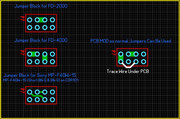
That’s all there is to it. Make sure to test before complete reassembly!

